What's inside
As an Amazon Associate I earn from qualifying purchases. This post may contain affiliate links at no extra cost to you.
Most people shopping for the best professional cnc wood carving machine are not confused about whether they want one. They are trying to figure out which specific machine will deliver clean relief cuts and precise lettering without fighting the software for three hours every evening. That distinction matters. A router that chatters on a half-inch pine blank at two hundred millimeters per minute is not a professional tool, no matter what the listing claims.
After spending time with machines ranging from entry-level kits to serious all-metal desktop routers, the honest dividing line in this category comes down to rigidity and control reliability. A five-hundred-watt spindle means very little if the frame flexes under load or the firmware drops a step mid-cut. Below, we rank eight machines that each solve a different slice of the problem, from the person carving custom signage on weekends to the small shop running repeat production jobs in hardwood.
As an Amazon Associate we earn from qualifying purchases at no extra cost to you.





Contents
Our Top Picks
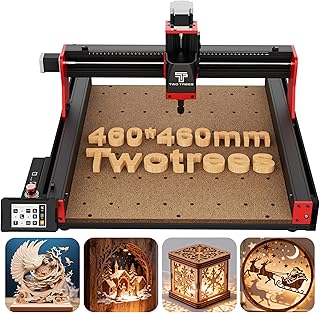
 Twotrees TTC450 Pro All-Metal CNC Router Machine with742mm X 689mm X 413mm18.11 x 18.11 x 3.15 inches45.2 poundsCheck on Amazon
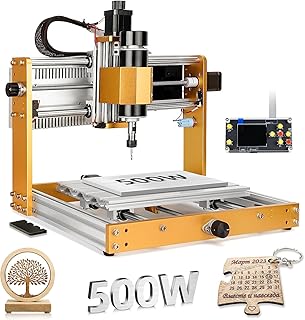
 WolfPawn CNC Router Machine 4040-PRO for Metal Acrylic4040 PRO15.75 x 15.75 x 2.95 inches42.2 PoundsCheck on Amazon


Quick Picks
| Product | Best for | Price |
|---|---|---|
| FoxAlien Masuter Pro | First serious CNC purchase | n/a |
| Twotrees TTC450 Pro | Standalone operation without a PC | n/a |
| CNC Router 4040-PRO | Compact metal and acrylic work | n/a |
| FoxAlien Masuter Pro MAX | Large-area wood relief work | n/a |
| Genmitsu 3018-PRO | PCB and small engraving projects | n/a |
| LUNYEE 3018 PRO MAX | Safe learning with hard stops | n/a |
| TTC3018 | Wireless file transfer workflow | n/a |
| LUNYEE 3020 Nova | Light metal cutting with precision | n/a |
How We Picked
We evaluated every machine on four criteria: structural rigidity under sustained feed, spindle power relative to advertised cutting depth, workflow friction from design file to finished part, and expandability through software compatibility and accessory support. Machines that required custom firmware flashes to function out of the box were penalized. Those with linear rails or ball screws over lead screws scored higher on repeatability, and brushless motors received a durability edge over brushed alternatives where other factors were equal.
The 8 Best Professional Cnc Wood Carving Machine in 2026
FoxAlien Masuter Pro
This is the machine we hand to the person who has been cutting with a scroll saw and wants to understand what CNC actually feels like. The all-metal structure gives it noticeably more stiffness than the plastic-framed kits in the same price tier, and it handles wood, acrylic, MDF, and nylon without the operator worrying about flex. The three-axis GRBL control is proven and well-documented, which means troubleshooting forums are deep. Two pros: the metal frame absorbs vibration well for cleaner surface finishes, and the material compatibility covers most hobbyist carving projects without tool changes. One con: the work area is modest for anyone planning multi-foot signs. Skip this one if you already have a larger machine or need to cut sheet stock.
Twotrees TTC450 Pro
The integrated 3.5-inch touch screen changes the workflow calculus here. You can load files and run jobs without keeping a computer tethered to the router, which is a real advantage in a garage shop where desk space is limited. The NEMA 57 stepper motor provides more torque than the smaller motors on budget machines, translating to better chip evacuation in hardwoods. Pros: the all-metal construction and NEMA 57 drive make this one of the stiffer desktop routers at this class, and the touch screen eliminates the laptop dependency. Con: the software ecosystem for touchscreen file management is less flexible than full GRBL on a desktop. Skip if you prefer precise manual jog control or need to run complex multi-tool-change jobs.
CNC Router 4040-PRO
With a 500-watt spindle and a working area of roughly 15.7 by 15.7 by 2.9 inches, this machine targets the niche where wood carving meets light metal and acrylic work. The lead-screw drive is a step below ball screws in precision, but it is forgiving and easy to maintain. Pros: the compact footprint fits on a standard workbench, and the GRBL control pairs well with open-source CAM software like Fusion 360 and Carbide Create. Con: lead screws wear faster than ball screws under continuous production loads, and the 2.9-inch Z travel limits deeper relief carves. Skip this if your primary material is hardwood with deep passes or if you need production repeatability over months.
FoxAlien Masuter Pro MAX
The 6060 work area is the headline here. If you are carving six hundred by six hundred millimeter panels with relief patterns, this is one of the few desktop machines that gives you that room without jumping to industrial pricing. The 500-watt brushless spindle runs quieter and longer than brushed alternatives, and GRBL control keeps the software path well-traveled. Pros: the generous bed handles full sign panels and decorative wall pieces, and brushless means less motor maintenance over years of use. Con: the larger frame demands more physical floor or bench space, and the added mass makes it harder to bolt down securely on a lightweight workbench. Skip if your shop is tight on square footage.
Genmitsu CNC 3018-PRO
This is the gateway machine, and it owns that role. The 300 by 180 by 45 millimeter area is small, but the offline controller means you can run stored jobs without a computer present, and the GRBL compatibility makes it a favorite among makers who want to tinker. Wood, acrylic, PCB, and PVC all work well within its modest power envelope. Pros: the ecosystem and community knowledge is unmatched at this size class, and the offline controller simplifies repetitive engraving tasks. Con: the 45-millimeter Z height is restrictive for anything beyond shallow carving or PCB work. Skip if you need to do deep relief in hardwood or cut thicker stock.
LUNYEE 3018 PRO MAX
LUNYEE took the 3018 platform and made it production-safer. The addition of limit switches and an emergency stop is a meaningful upgrade for anyone running the machine in a shared shop or leaving it unattended during engraving passes. The 500-watt spindle provides noticeably more cutting authority than the base 3018, and the extra 35 millimeters of Z travel compared to the standard gives you more depth room. Pros: the emergency stop and limit switches make this the safest option in the 3018 family, and the all-metal frame improves rigidity over open-frame kits. Con: the GRBL offline controller is functional but less responsive than running through a desktop interface. Skip if you want the largest possible work area or need to run complex multi-pass tool changes unattended.
TTC3018
Built-in WiFi on a CNC router at this size class is a genuine workflow improvement. You send the file from your design laptop across the room and walk away, rather than plugging a USB cable every session. The 775 motor is a brushed unit, so it is the serviceability-focused choice, and the material range covers wood, acrylic, plastic, and aluminum at engraving depths. Pros: wireless file transfer reduces cable clutter and lets you position the machine away from your desk, and the aluminum-cutting capability is unusual at this tier. Con: the 775 brushed motor will need brush replacement over heavy use, and WiFi can drop in cluttered RF environments. Skip if you run production jobs that cannot tolerate a lost connection mid-pass.
LUNYEE 3020 Nova
This is the machine that bridges the gap between hobby router and light industrial tool. Ball screws on all three axes with linear guides deliver repeatability that lead-screw machines simply cannot match, and the 800-watt trimmer router cuts aluminum, brass, wood, acrylic, MDF, and plastics with authority. For anyone who has outgrown a 3018-class machine but cannot justify a six-figure industrial router, this is the answer. Pros: ball screw and linear guide combination provides precision and durability for long-term production, and 800 watts of spindle power handles metals most desktop routers refuse. Con: the trimmer-style spindle is louder and shorter-lived than a dedicated CNC spindle, and the price places it firmly in the enthusiast-to-semipro tier. Skip if your work is strictly wood engraving and you do not need metal cutting capability.
Buying Guide
Frame Material and Rigidity
Every desktop CNC router in this roundup uses some form of metal construction, but the type of metal and its thickness determine whether the machine holds tolerance under load. All-metal frames made from extruded aluminum or steel plate resist torsional flex far better than mixed plastic-and-metal assemblies. When evaluating specs, look for whether the axes use linear guides or plain bearings, and whether the drive mechanism is a ball screw, lead screw, or belt. Ball screws on all three axes give you the best repeatability and longest service life. Lead screws are adequate for hobby use but introduce backlash that shows up as visible ridges in carved surfaces.
Spindle Power and Motor Type
Power ratings between 500 and 800 watts define the practical cutting envelope. A 500-watt spindle handles softwoods, MDF, acrylic, and aluminum foil cleanly, while 800-watt machines can take light passes through harder metals and dense hardwoods. Brushless motors last significantly longer and run cooler under sustained duty cycles, but they cost more and typically offer less low-end torque than brushed alternatives at the same wattage. If your work involves repeated deep passes in hardwood, prioritize brushless. If you mostly do engraving and shallow relief, a brushed motor with a trimmer attachment is perfectly serviceable and easier to replace.
Control Interface and Software Workflow
GRBL is the de facto firmware standard in this category, and it determines which CAM software you can use. Machines with offline controllers let you store and run jobs from an SD card without a connected computer, which simplifies shop layout. Touchscreen integration goes further by letting you manage files directly on the machine. WiFi control adds convenience but introduces a failure mode that a wired connection does not. For production reliability, a wired USB connection to a dedicated laptop remains the most stable option. Evaluate whether your workflow benefits from wireless convenience or whether a few minutes of cable management per job is a worthwhile trade for zero dropped connections.
Our Verdict
The top pick for most buyers seeking the best professional cnc wood carving machine is the LUNYEE 3020 Nova. Its ball screw and linear guide construction with 800-watt spindle delivers the best combination of precision, power, and long-term durability at the desktop scale. For budget-conscious buyers, the Genmitsu 3018-PRO remains the definitive entry point due to its unmatched community support and low cost of entry. If your priority is working without a dedicated computer, the Twotrees TTC450 Pro wins that specific condition outright thanks to its integrated touch screen and NEMA 57 torque advantage.
FAQ
Can a desktop CNC router handle hardwoods like walnut or oak?
Yes, but you need adequate spindle power and rigidity to avoid chatter. Machines with 500 watts or more and all-metal frames handle these woods well at shallow to moderate depths. Lead-screw machines will produce visible tool marks in dense hardwood compared to ball-screw models.
What is the realistic difference between a 300-watt and 800-watt spindle?
The 800-watt spindle maintains RPM under load far better, which means cleaner cuts in harder materials and deeper passes per cut. A 300-watt spindle in the same material will bog, burn, or stall. The difference becomes decisive once you move beyond pine and basswood.
Do I need a computer to operate any of these machines?
Not all of them. Models with offline controllers or touchscreens can run pre-prepared files independently. However, designing toolpaths and converting your artwork to G-code requires a computer with CAM software regardless of the machine.
How loud are these machines during operation?
All of them are loud enough that hearing protection is recommended during extended use. Brushless spindles and trimmer-style routers produce more noise than the stepper motors do. If you work in a shared space, expect to need an enclosure or schedule cuts for times when others are absent.